



Point Claude at your buildings

Normal ships an MCP server. Connect it and Claude can search your points, read live values off the controllers, and write hooks against your equipment model — over the same tunnel and the same permissions you already use.

What that looks like

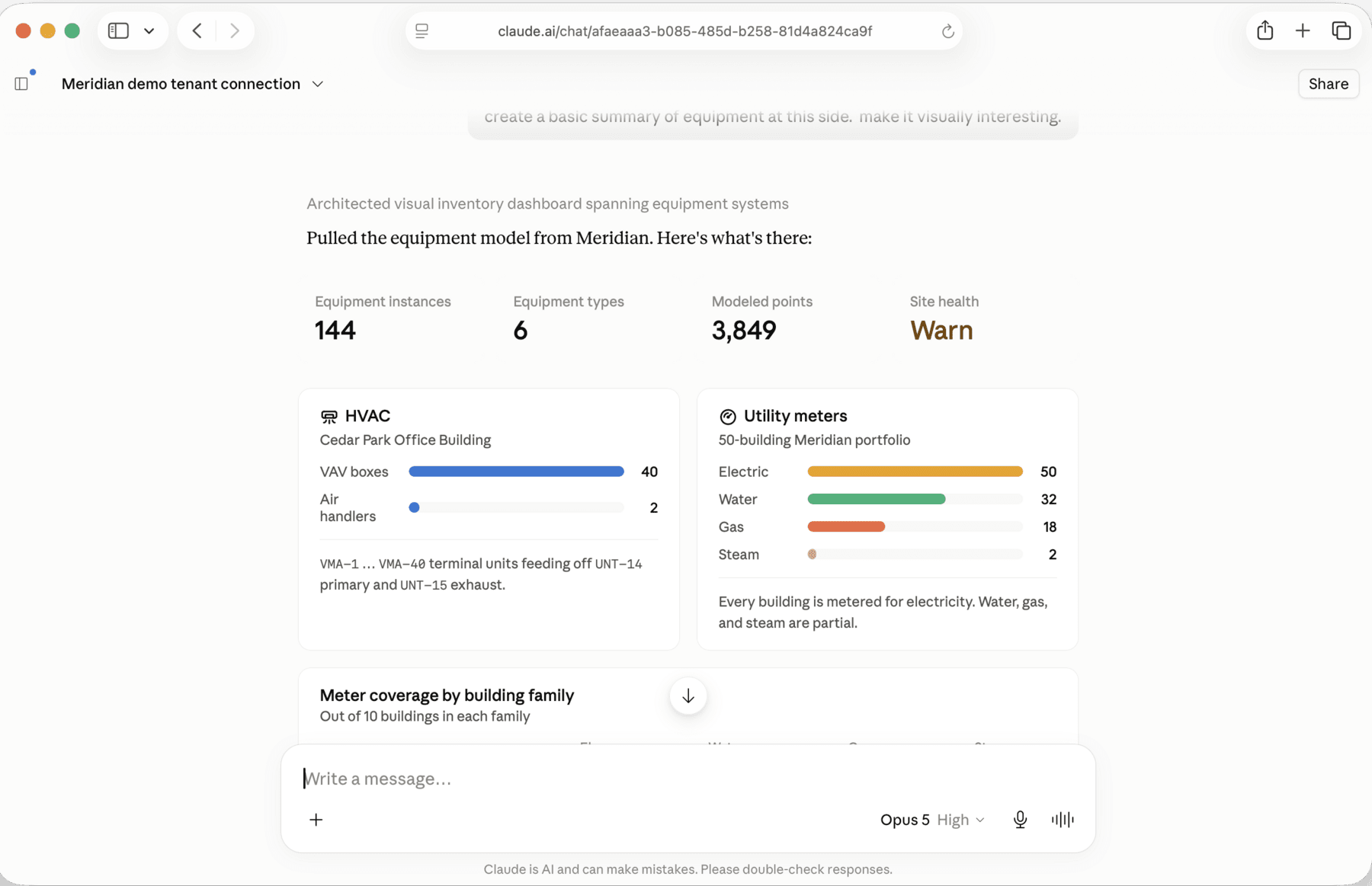
One prompt — “create a basic summary of equipment at this site” — against a connected site. Claude pulled the equipment model itself and built this.

Claude summarizing a site's equipment model pulled through the Normal MCP server
144 equipment instances, 3,849 modeled points, meter coverage across a 50-building portfolio — none of it typed in by hand.

What an agent can do

All of it runs through the tunnel your site already has, under your existing permissions. An agent reaches what you have granted it and nothing else.

See every site

List your sites, check their health, and find out what is connected — without logging into each one in turn.

Work out what a building has

Query layers and unmodeled points to figure out what is in a site you have never seen. Usually the slowest part of starting an integration.

Read live values

BACnet reads straight off the controller, so the answer comes from the equipment rather than from a guess about the last trend sample.

Find what the scan missed

Review scan coverage and trigger a rescan, so a gap gets fixed instead of just reported.

Write hooks

Generate JavaScript against your normalized model, in the environment where it will actually run, and commit it with the built-in Git support.

Write only what you allow

Anything that writes goes through the command service, so it inherits priority, lifetime, automatic relinquish, and whatever allow rules you configured.

The model is the hard part

Most portfolios are not ready for this. The point names are cryptic, nothing is tagged, and there is no way for software to reach the equipment without someone opening a VPN. An agent pointed at that will give you fluent answers you cannot check.

What makes the difference is unglamorous: a normalized model, and an authenticated path to read and write. Normal is the part that gets you there. The agent on top is comparatively easy.


AI-assisted modeling, in the console

  • Enrich normalized points with descriptions, functional roles, units, and attributes in a click
  • Pull floor, room, zone, or equipment type from a sibling sensor onto every matched point automatically
  • Build repeatable workflow patterns instead of hand-tagging each building
  • Review every proposed change before it touches your database

Setting it up

Add the Normal MCP server to Claude Code or Claude Desktop, sign in with your Normal account, and choose a site. That is the whole configuration.

The site needs an active tunnel to Normal Online. The free tier includes one, so you can try this on your first building without buying anything.

What's next

The MCP server shipped this year and we keep adding to what it can reach. Next up:

  • Setting up quality rules, guardrails, and alerts in plain language
  • Troubleshooting that ties quality flags back to network topology
  • Cleaning up and normalizing a whole portfolio in one pass
  • Agent access to schedules and commissioning workflows

The goal is the same as it has always been: make buildings faster to integrate and easier to run.